Icon of program: Snapchat

Snapchat for Windows

  • Free
  • 4.5
    41
  • 99.6K
  • V3.0.1.0
Free Download for Windows

View an ad to download for free

Core Snapchat communication on desktop

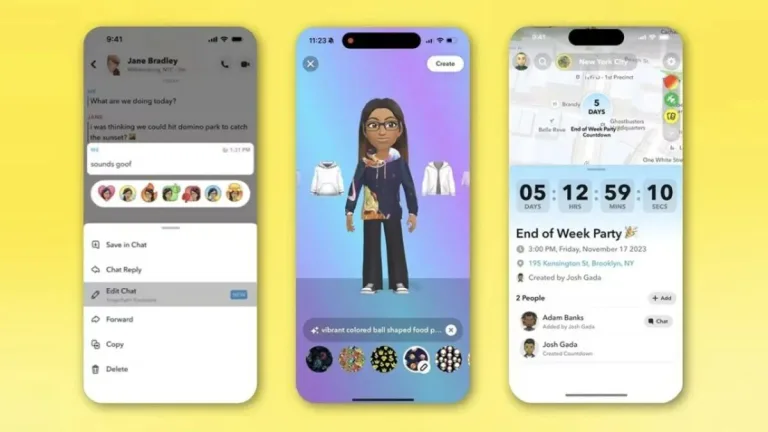
Snapchat by Snap Inc. offers a desktop-friendly way to stay connected without relying solely on a mobile device. Snapchat focuses on core communication features such as messaging, snaps, and video calls, making it useful for users who prefer larger screens and keyboard input. Snapchat runs through a modern web-based experience rather than a fully native desktop app, prioritizing accessibility and convenience while maintaining familiar interactions from the broader Snapchat ecosystem.

Top Recommended Alternative

Messaging and calling across devices

Snapchat allows users to continue conversations on desktop through text messaging, snaps, and video calls using built-in microphones and webcams. Snapchat mirrors essential communication tools from its mobile experience, enabling ongoing chats and real-time calls without switching devices. While advanced creative tools are reduced, Snapchat maintains consistent contact lists and conversation history, helping users stay connected across environments with minimal disruption to established communication habits.

Bitmoji and personalization features

Snapchat supports Bitmoji avatar creation and customization within its desktop experience, allowing users to personalize interactions without needing a phone. Snapchat keeps visual identity consistent across devices, ensuring avatars and profiles remain synchronized. Although creative snapping tools and editing options are more limited than on mobile, Snapchat still supports sending snaps and maintaining expressive conversations through stickers, avatars, and standard messaging features.

Final thoughts

Snapchat provides a practical desktop extension focused on communication rather than full creative control. Snapchat suits users who want to message, send snaps, and make video calls from a computer while keeping their social connections intact. While it does not replace the complete mobile experience, Snapchat delivers a reliable and accessible way to stay engaged on desktop using familiar tools and streamlined functionality.


  • Pros

    • Supports messaging, snaps, and video calls on desktop
    • Bitmoji customization available without mobile use
    • Consistent conversations across devices
  • Cons

    • Limited content creation tools compared to mobile
    • Web-based experience lacks native desktop features
 0/1

App specs

  • License

    Free

  • Version

    3.0.1.0

  • Latest update

  • Platform

    Windows

    Other platforms (2)
  • OS

    Windows 11

  • Downloads

    99.6K

    Last month's downloads

    • 8.5K
  • Size

    1.10 MB

  • Developer

Also available in other platforms

Program available in other languages


Icon of program: Snapchat

Snapchat for PC

  • Free
  • 4.5
    41
  • 99.6K
  • V3.0.1.0
Free Download for PC

View an ad to download for free


User reviews about Snapchat

Have you tried Snapchat? Be the first to leave your opinion!

Add review

You may also like

Explore Apps

Related Articles

Latest articles

Laws concerning the use of this software vary from country to country. We do not encourage or condone the use of this program if it is in violation of these laws.
Softonic

Is Snapchat safe?

100/100

Score result: Clean

This file passed a comprehensive security scan using VirusTotal technology. It is safe to download.

  • Virus free
  • Spyware free
  • Malware free
  • Verified by Security Partners

    VirusTotal logo

Scan Info

Last scan
Wednesday, October 15, 2025
Scan provider
VirusTotal · Full report

File Integrity

File
Snapchat_Installer.exe
SHA256
cdd1a8779ca627885d4447dc388a5ee78cefcfcda949d33ded604fddc5d3c5cb
SHA1
64fbd6f6bded1e46f01affb5266e51146c09ce41

Softonic security commitment

Snapchat has been thoroughly scanned by our advanced security systems and verified by industry-leading partners. This file comes from the official developer and has passed all our security checks, showing no signs of viruses, malware, or spyware. For more information, visit our Security and Trust Center